About FTO MCP
Last updated 4 days ago
Connect ChatGPT, Claude or another AI assistant to Forex Tester Online. Describe a trading idea in plain words, and the assistant builds it, backtests it on historical data and explains the results.
What is MCP
MCP (Model Context Protocol) is an open standard that lets AI assistants use outside tools. FTO adds a set of trading tools to your assistant: projects, charts, indicators, strategies, backtests and statistics. Everything happens in your own FTO tab, so you can watch it work.
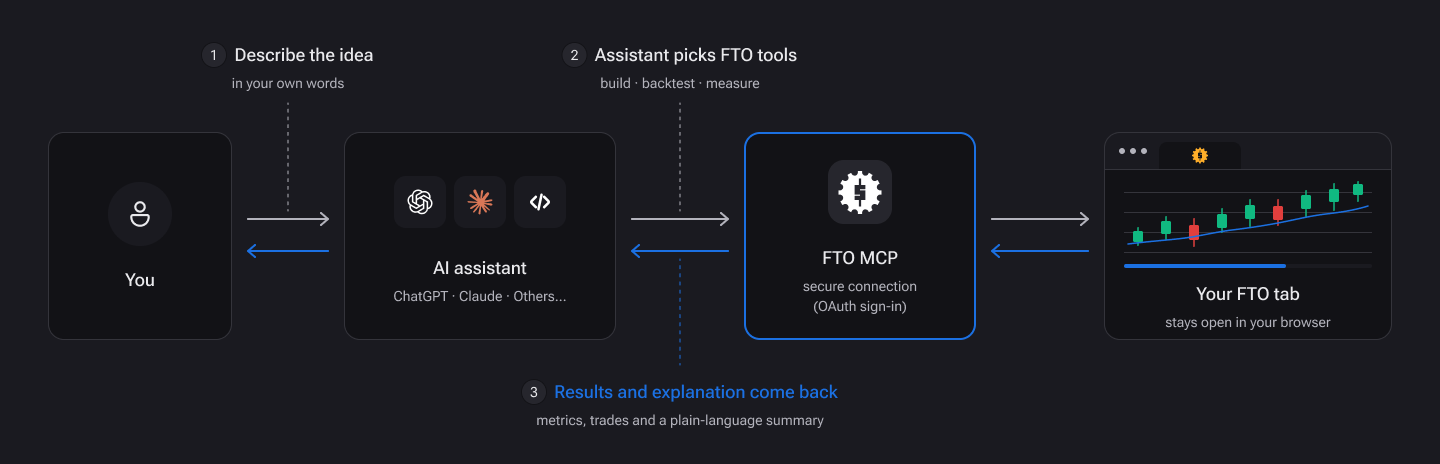
How to connect
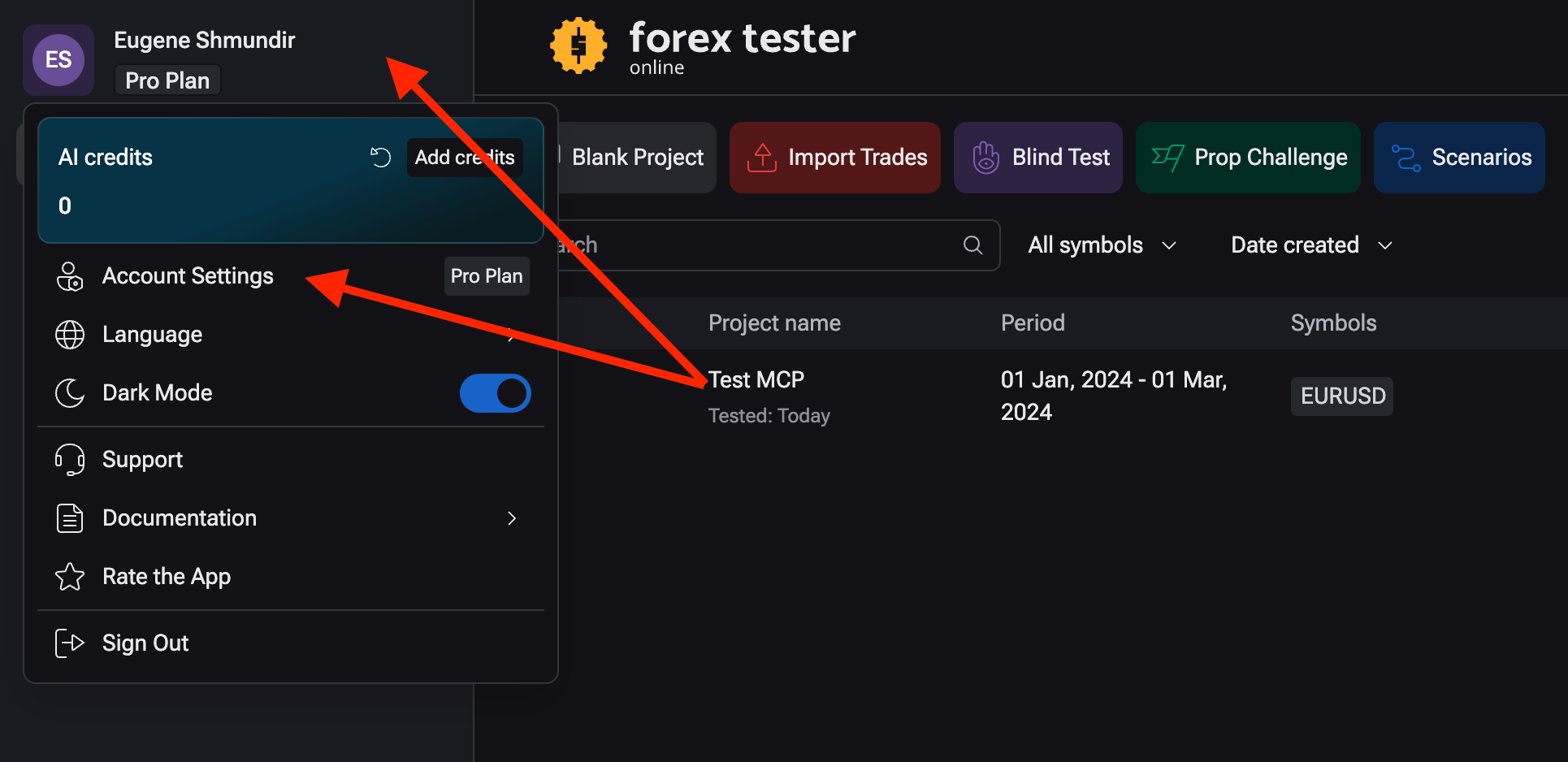
Sign in to FTO and open Profile > Account Settings.
Under AI agents, turn on Enable MCP access.
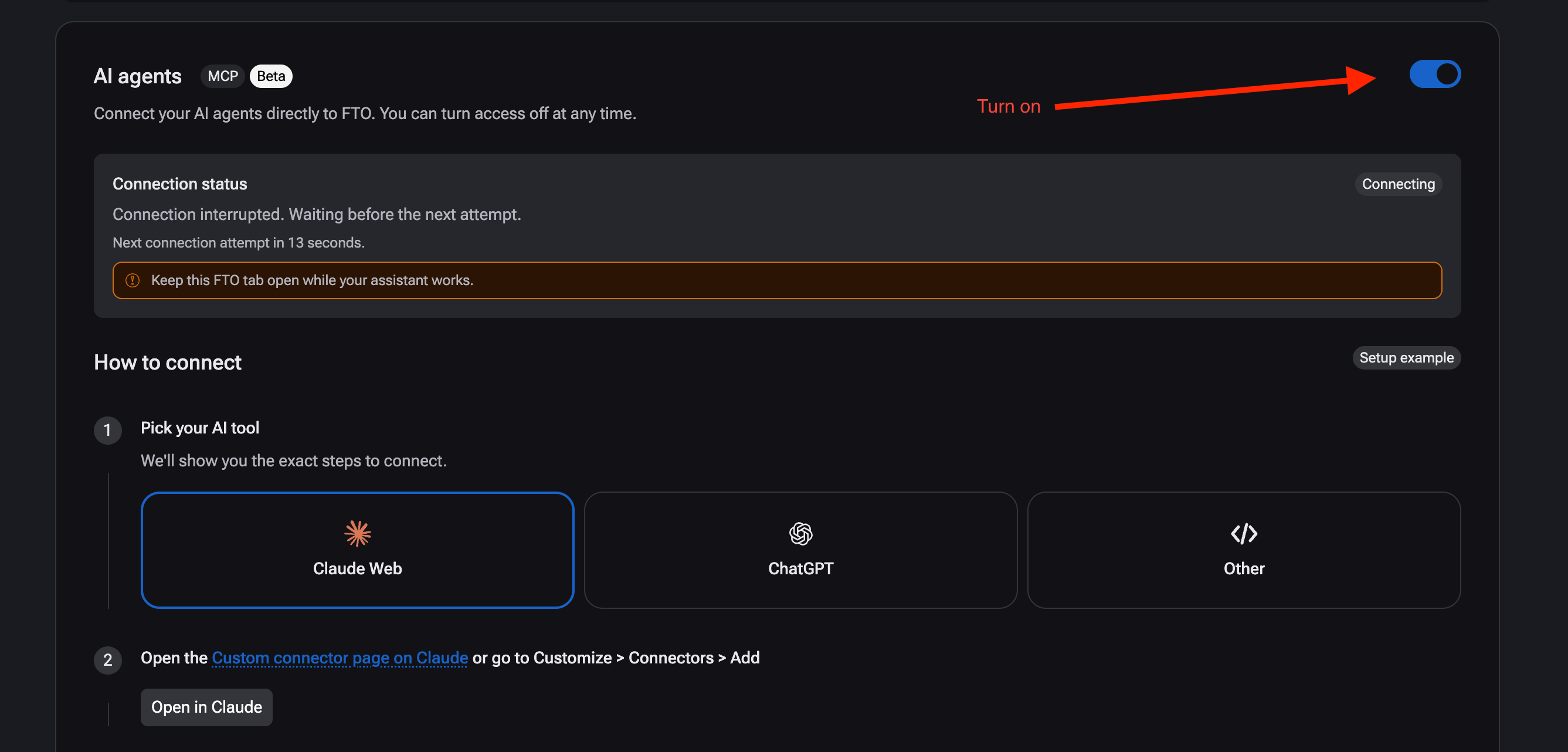
Wait for Connected, then select Copy URL and follow the instructions.
See detailed instructions how to connect ChatGPT or Claude.
Keep FTO tab open while using your assistant.
What you can do with FTO MCP
Analyze your real trades
Import your trade history from MT4, MT5, NinjaTrader or TradingView. Your AI reviews them like a trading journal with answers: what went wrong, which sessions and exits cost you most, and what to test next.
Compare markets and timeframes
Ask for the same strategy on EURUSD and gold, on H1 and H4. Your AI sets up each test, runs them one after another and compares the results.
Test different exits
Keep your entries. Exit Optimizer tries stop-loss, take-profit and holding-time combinations on your test. Then ask your AI to check the winner on a fresh period.
Example prompts
A strategy from your rules - You get a saved test with every trade on the chart, win rate, profit factor and drawdown.
Turn this into a strategy (EA) and backtest it on NQ futures M5 for Q1 2025: trade the opening range breakout (ORB) at the New York open, stop on the other side of the range, target 2R.
Your real trades - You get a breakdown by session, weekday and exit, and a short list of what to test next.
Import my MT5 trade history and analyze it: what went wrong, which sessions and exits cost me the most, and what should I change?
Losing trades - You get the patterns behind your losses, each as an idea ready to test.
Look at the losing trades in this test. What do they have in common, and what should I test next?
A custom indicator - You get an indicator on your FTO chart that you can keep, tweak and reuse.
Build an indicator that marks ICT liquidity sweeps and Fair Value Gaps on GBPJPY M15 and add it to my chart.
Prop challenge odds - You get pass and fail odds from a challenge simulation on your own trades.
How likely is this strategy to pass a challenge with a 10% target, 5% daily loss limit and 10% max drawdown in 90 days?
Manual practice - Your AI steps the chart for you and logs every trade in your journal.
Open EURUSD on M15, step to the London open and wait. I will tell you when to buy or sell, then tag each trade in my journal.
Your AI can use the FTO features your plan includes. Futures symbols, trade history import and prop-challenge simulation are part of Pro.
Plans usage
FAQ
Can ChatGPT or Claude backtest a trading strategy?
Can ChatGPT or Claude backtest a trading strategy?
On their own they can write code and estimate, but they have no market history and no tested engine of their own, so the result is hard to trust. Connected to Forex Tester Online they run the test on FTO’s engine with real data, and you can open every trade on the chart.
How do I backtest a trading strategy with AI?
How do I backtest a trading strategy with AI?
Describe your rules in plain English: entry, stop, target, market and period. Your AI builds the test in Forex Tester Online, runs it on historical data and reports the trades, win rate, profit factor and drawdown. Then you check the trades on the chart and decide what to test next.
What is the best AI for trading and backtesting?
What is the best AI for trading and backtesting?
An AI assistant is not a crystal ball, so the useful question is which one tests ideas well. Any capable assistant needs a real backtester behind it. FTO MCP works with Claude and ChatGPT, the two assistants we test and write guides for; other MCP clients can connect, but not every one works yet.
Which Forex Tester Online plan do I need for AI backtesting?
Which Forex Tester Online plan do I need for AI backtesting?
FTO MCP is included in both paid plans, Starter and Pro, at no extra charge. Starter comes with 10,000 MCP tokens a month and Pro with 30,000. Your AI can use everything your plan includes in FTO; features outside your plan stay locked for the AI too. Pro adds 727 symbols with CME futures, trade history import, Exit Optimizer, Monte Carlo and prop-challenge simulation.
What are MCP tokens and how fast are they used?
What are MCP tokens and how fast are they used?
MCP tokens measure how much your AI does in FTO. Reading data costs 1 token, a change such as placing an order costs 2, and a heavy job such as a full strategy run costs 10. Service calls, such as checking your balance or listing your projects, are free. In our tests an hour of intensive AI work used about 1,800 tokens, so Starter covers roughly 5 hours a month and Pro roughly 15. Tokens renew every month from your purchase date, and your own work in FTO is never limited by them.
Can I backtest futures, forex and gold with AI?
Can I backtest futures, forex and gold with AI?
Yes. Forex Tester Online covers Forex pairs, gold and other commodities, indices, stocks, crypto and CME futures such as NQ, with up to 23 years of tick data. Which symbols you get depends on your plan.
Is this an AI trading bot? Does it trade real money?
Is this an AI trading bot? Does it trade real money?
No. Everything runs on historical data inside Forex Tester Online with simulated trades. There is no broker connection and no signals, and nothing here is trading advice. Past results do not predict future results.
How accurate is an AI backtest?
How accurate is an AI backtest?
The numbers come from FTO’s own engine, the same one behind your manual tests, with the trading costs you set. Your AI can still misread a rule you described, so open the project and check the trades on the chart, and confirm a good result on a fresh period.
Is the AI built into Forex Tester Online?
Is the AI built into Forex Tester Online?
No. FTO MCP is a connection, not a chatbot: you keep using your own assistant and FTO gives it a backtesting engine. Whether you need a paid ChatGPT or Claude plan depends on your AI provider, because custom connectors are a feature of their plans.
What can my AI see and change?
What can my AI see and change?
Only your Forex Tester Online account: projects, trades, journal and analytics. When you ask, it can create, change and delete things there, and everything it makes is a normal FTO object you can open yourself. It works through your open, signed-in FTO tab, so keep that tab visible. To switch it off, turn off Enable AI access in Account Settings (the switch applies to the browser you are in) or remove the connector in your assistant.
Was this helpful?
Still need help? Share an idea