4 months later, same issue. Is anybody reading these bug reports? :)
CC @Serhii Support@Oleksii (Support)@Andrii [Support]
zen
•
Feb 10, 2025
6 months later, same issue :) Is it so hard to send to back a drawing?
This is is something needed daily.
Any ETA?
@Alex Koval (FTO Product Lead)
Serhii S.
Team•
Feb 10, 2025
Hi @zen! Thank you for your request. Please note that this feature works when there are 2 graphic tools overlapping each other. Thank you.
zen
•
Feb 10, 2025
sorry, I don’t understand; please explain with a screenshot; thanks
Serhii S.
Team•
Feb 10, 2025
Please pay attention to the rectangles. The red and blue rectangles can change their position relative to each other using this feature.
zen
•
Jun 18, 2025
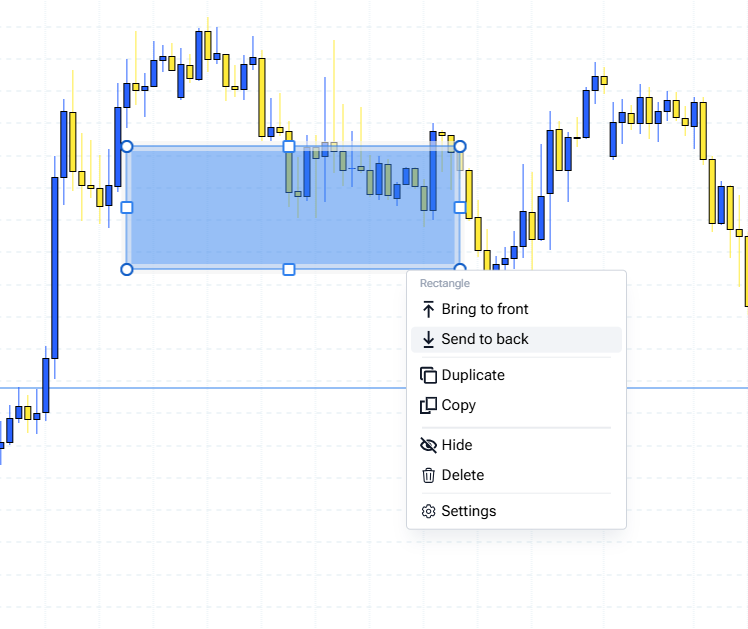
@Serhii S. , my issue is with graphic overlapping with chart, not between graphics :)
Serhii S.
Team•
Jun 18, 2025
Hi @zen , sorry about that.
Our developers are currently focused on fixing some high-priority bugs. As a temporary workaround, you could try reducing the opacity in the rectangle's settings.
Unfortunately, I don't have an ETA for a permanent fix at the moment.
zen
•
Jun 18, 2025
any eta for this fix? graphic still overlaps chart
Comments14
zen
Jul 31, 2024
zen
Aug 14, 2024
same issue
zen
Oct 11, 2024
Same issue
zen
Oct 16, 2024
Hello! Any updates on this? Send to back still doesn’t work. Thank you
@Andrii [Support] @Serhii Support @Oleksii Manziuk (Support)
zen
Dec 4, 2024
4 months later, same issue. Is anybody reading these bug reports? :)
CC @Serhii Support @Oleksii (Support) @Andrii [Support]
zen
Feb 10, 2025
6 months later, same issue :) Is it so hard to send to back a drawing?
This is is something needed daily.
Any ETA?
@Alex Koval (FTO Product Lead)
Serhii S.
Feb 10, 2025
Hi @zen! Thank you for your request. Please note that this feature works when there are 2 graphic tools overlapping each other. Thank you.
zen
Feb 10, 2025
sorry, I don’t understand; please explain with a screenshot; thanks
Serhii S.
Feb 10, 2025
Please pay attention to the rectangles. The red and blue rectangles can change their position relative to each other using this feature.
zen
Jun 18, 2025
@Serhii S. , my issue is with graphic overlapping with chart, not between graphics :)
Serhii S.
Jun 18, 2025
Hi @zen , sorry about that.
Our developers are currently focused on fixing some high-priority bugs. As a temporary workaround, you could try reducing the opacity in the rectangle's settings.
Unfortunately, I don't have an ETA for a permanent fix at the moment.
zen
Jun 18, 2025
any eta for this fix? graphic still overlaps chart