Hello, please add horizontal rays with behaviour like in Trading View. Horizontal ray’s text aligned to the right is always visible on the chart - very good for describing important price levels.
Serhii S.
Team•
Dec 30, 2024
Hi @User! Please use the Ray tool and hold Shift while placing it. This way you can place the ray horizontally. Thank you.
Bradley Tong
•
Dec 30, 2024
Hi Thank you for you comment.
I have found this tool however it is not useful for the way I want to use it.
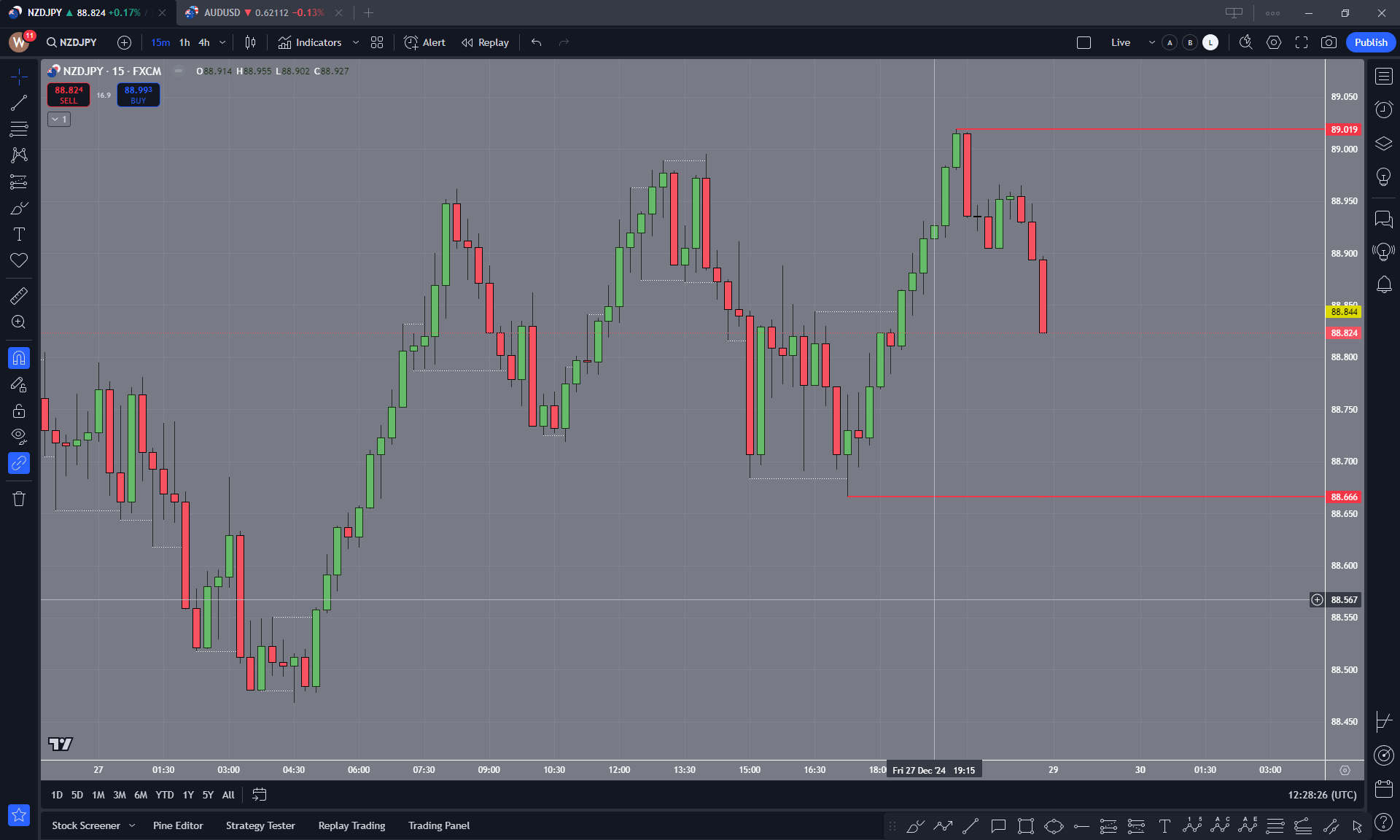
I want to keep moving the horizonal ray to new candles as price action breaks the low/high.
With this tool, when I want to move the ray I can only move one of the two points at a time. This means that the ray does not continue to be a ray after it is first placed.
Please see this image below to understand what I mean.
What would be useful is for the Horizonal Ray to only have ONE point that can be moved.
Serhii S.
Team•
Dec 31, 2024
Hi @User!
Thank you for your detailed clarification and screenshots. We will consider your suggestion. Just in case, if you want to move the ray after placing it, you can drag it between points. Thank you.
Bradley Tong
•
Dec 31, 2024
Thank you. I have been using that. But I am trying to get it to snap to new lows of price action.
Thank you for considering my feedback
Serhii S.
Team•
Jan 2, 2025
Thank you for your feedback! It’s great to hear you’ve been exploring this.
Comments6
An Anonymous User
Feb 18, 2025
Hello, please add horizontal rays with behaviour like in Trading View. Horizontal ray’s text aligned to the right is always visible on the chart - very good for describing important price levels.
Serhii S.
Dec 30, 2024
Hi @User! Please use the Ray tool and hold Shift while placing it. This way you can place the ray horizontally. Thank you.
Bradley Tong
Dec 30, 2024
Hi Thank you for you comment.
I have found this tool however it is not useful for the way I want to use it.
I want to keep moving the horizonal ray to new candles as price action breaks the low/high.
With this tool, when I want to move the ray I can only move one of the two points at a time. This means that the ray does not continue to be a ray after it is first placed.
Please see this image below to understand what I mean.
What would be useful is for the Horizonal Ray to only have ONE point that can be moved.
Serhii S.
Dec 31, 2024
Hi @User!
Thank you for your detailed clarification and screenshots. We will consider your suggestion. Just in case, if you want to move the ray after placing it, you can drag it between points. Thank you.
Bradley Tong
Dec 31, 2024
Thank you. I have been using that. But I am trying to get it to snap to new lows of price action.
Thank you for considering my feedback
Serhii S.
Jan 2, 2025
Thank you for your feedback! It’s great to hear you’ve been exploring this.