Ghost/Mirror Image Appearing When Using Risk to Reward Tool
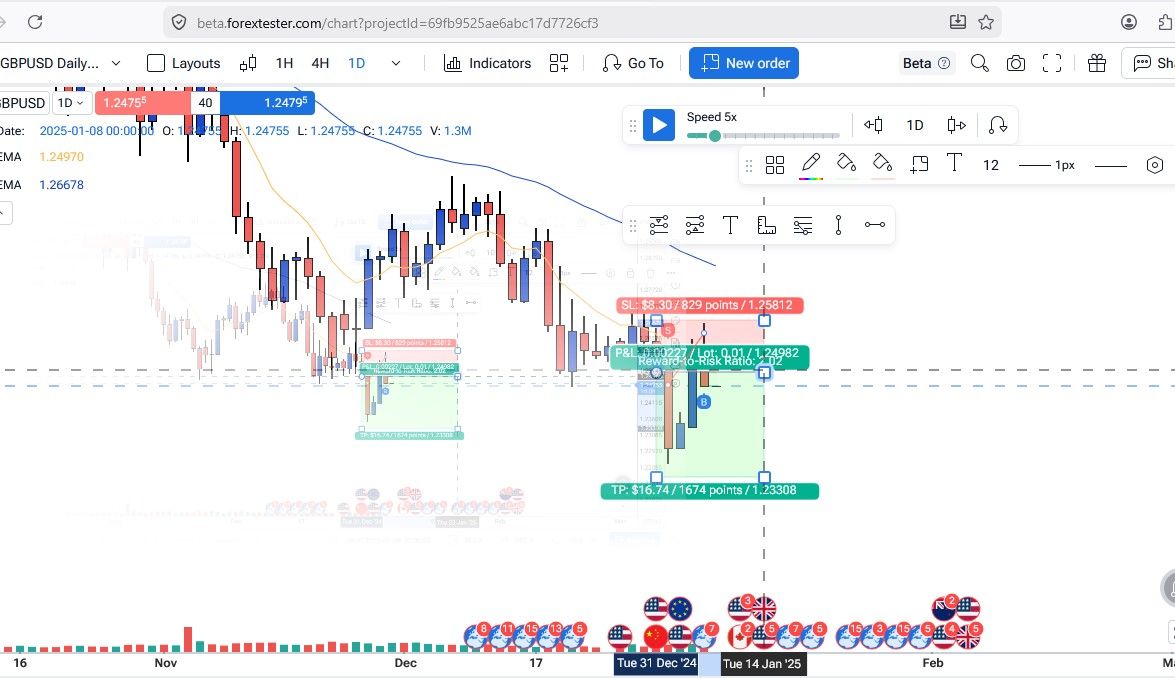
When I move a Risk to Reward tool (displayed in green and red) on the chart, a ghost/mirror image of the tool appears elsewhere on the chart simultaneously. This duplicate rendering persists as I reposition the drawing, creating a confusing and inaccurate visual overlay.
Steps to Reproduce:
Open a chart on the Beta platform (beta.forextester.com) in FireFox
Select a drawing tool (e.g., trade/order block tool shown in green and red)
Move or drag the drawing tool across the chart
Observe the ghost/mirror image appearing at a separate location on the chart
Environment Details:
Platform: ForexTester Beta (beta.forextester.com)
Chart: GBPUSD Daily (1D)
Date on chart: Around January 14, 2025
Indicators visible: EMA 10, EMA50
Browser: FireFoxx (based on UI)
Impact: The ghost image makes it difficult to accurately place trades and analyse chart levels, as the duplicate drawing causes confusion about the actual tool placement.
I have attached a screenshot clearly showing both the original drawing tool and its mirror/ghost image on the chart.
- How does this impact your experience?
Comments5
Diana Zhoshko
May 12
@Nkosana Ncube
We weren’t able to reproduce this issue on our side. Could you please try using the Chrome browser instead and let us know if the ghost/mirror image behavior still occurs there? This will help us narrow down whether it’s specific to Firefox.
An Anonymous User
May 22
This seems to be a Firefox browser issue but l will definitely notify you if l encounter a similar issue on the Chrome browser
Nkosana
May 27
kindly note that l havent experienced a similar challenge on Chrome. I think the issue might be linked to the Firefox browser
Diana Zhoshko
Jun 5
Hi @Nkosana,
Thanks for the update.
For now, we recommend using the FTO on a computer/laptop via the Chrome browser to have the best experience
Diana Zhoshko
May 12
Hello @Nkosana Ncube,
Thank you for the detailed explanation.
I’ve already passed your issue along to our development team for further investigation.
As soon as I receive any updates or a proposed solution, I’ll follow up with you right away.