Favourites Drawing Tool Toolbar Disappears on Backtesting Session Resume
I am writing to report a bug with the Favourites drawing tool feature on the Beta platform.
Bug Description: When I mark drawing tools as favourites (indicated by the star icon), a floating toolbar appears showing all favourited tools. However, every time I resume a backtesting session, this favourites toolbar does not appear — it only reappears after I favourite an additional drawing tool during that session.
Steps to Reproduce:
Open a chart on beta.forextester.com
Mark one or more drawing tools as favourites (e.g. Vertical Line, Horizontal Line, Trend Line, Horizontal Ray)
Confirm the floating favourites toolbar appears on the chart
Close or pause the backtesting session
Resume the backtesting session
Observe that the floating favourites toolbar is no longer visible
Open the drawing tools menu and favourite one additional tool
Observe the floating toolbar reappears
Expected Behaviour: The floating favourites toolbar should persist and be visible automatically whenever a backtesting session is active, without requiring the user to add another favourite to trigger it.
Actual Behaviour: The toolbar is invisible on session resume and only reappears after a new tool is starred.
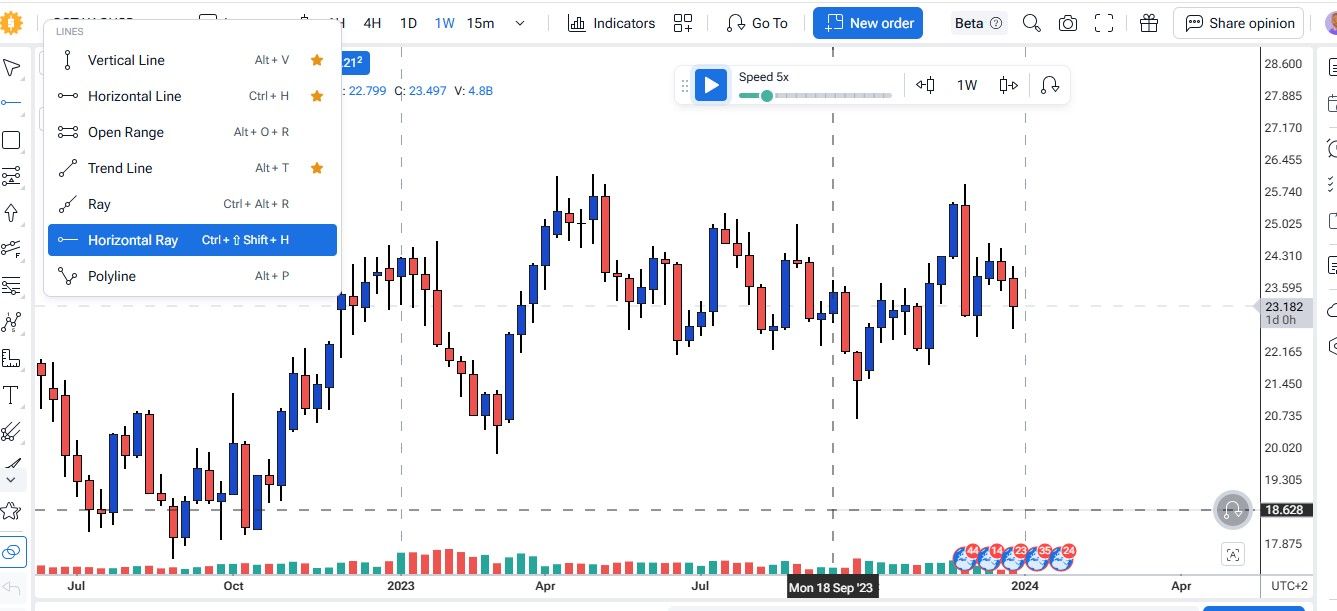
I have attached two screenshots:
Image 1: Session resumed — favourites are starred but the floating toolbar is absent
Image 2: After starring one additional tool — the floating toolbar reappears correctly
This is disruptive to workflow as it requires an unnecessary extra step each session. Please advise whether this is intended behaviour or a known issue.
- How does this impact your experience?
Comments1
Serhii S.
Jun 4
Hi @Nkosana! Thank you for the detailed feedback.
I have already reported this to our developers. After you mark any tool with a star, a star button will appear in the lower left corner. Please turn this button off and then on again.
After that, the problem should not recur.
Thank you!