Bug Report: Removed Shortcut Triggers Unexpected Actions
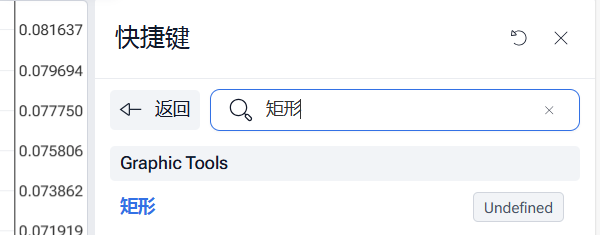
I encountered a bug in the trading backtesting platform related to keyboard shortcuts. If I remove a shortcut, it appears as "undefined" in the shortcut settings. However, after removal, pressing any key on the keyboard unexpectedly triggers the corresponding action.
For example, if I remove the shortcut for drawing a rectangle, pressing any key (such as ESC or DEL) causes the rectangle tool to be selected. If I press DEL to delete the rectangle, it gets removed, but the rectangle tool is immediately reactivated. Clicking the mouse again draws a new rectangle.
Please confirm this issue and fix it as soon as possible. Thank you.
Comments6
Only One Hope Ministries
Jun 10, 2025
Hello I had the exact same experience. Thanks.
Serhii S.
Jun 10, 2025
Hi @TheodoreLucian! Thank you for reaching out to us. Can you please clarify your device, operating system, and browser? We’ll try to reproduce the bug.
An Anonymous User
Jun 10, 2025
Chorme Browser
Windows 11
I wanted to delete a multi-line via “delete” key.
The “create new project” widow popped up.
I went to shortcut keyboard, yet it is “undefined”.
I deleted the “undefined” key
Then I tried deleting the same multi-line and another window popped up
Only One Hope Ministries
Jun 10, 2025
Chorme Browser
Windows 11
I wanted to delete a multi-line via “delete” key.
The “create new project” widow popped up.
I went to shortcut keyboard, yet it is “undefined”.
I deleted the “undefined” key
Then I tried deleting the same multi-line and another window popped up
Serhii S.
Jun 10, 2025
Thanks for the detailed bug report and for providing your system info.
I've passed this information on to our development team to investigate.
Serhii S.
Mar 25, 2025
Hi @User Thank you for the detailed description of the bug.
Unfortunately, I can’t reproduce it. We would be grateful for the video if it is possible for you. We appreciate your patience.