26th FTO Release (22.12.2025)
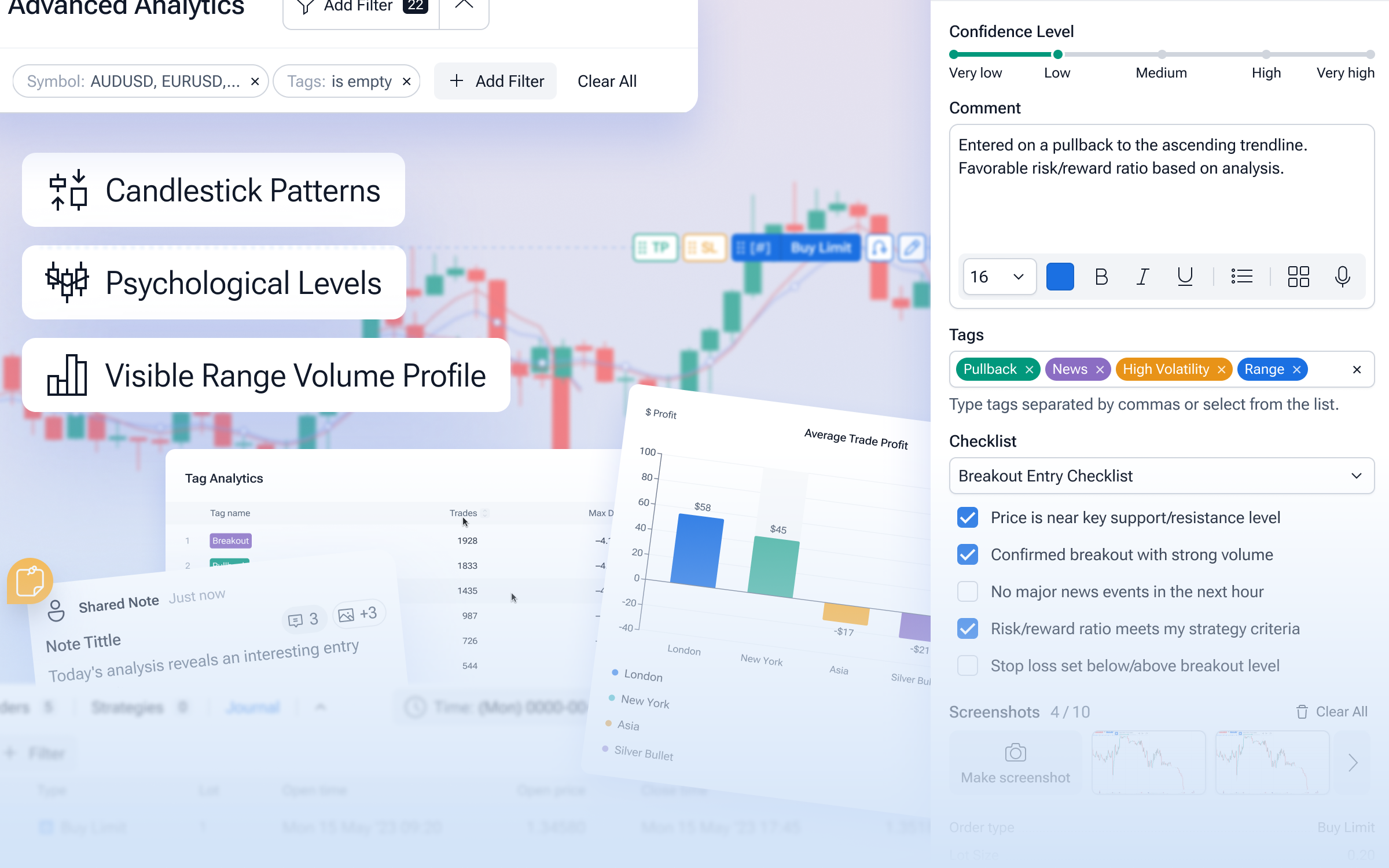
This release introduces powerful new trading tools, meaningful workflow improvements, and a wide range of stability fixes — all aimed at making FTO more efficient, more flexible, and more enjoyable to use.
Here’s what’s new:
🔧 New Features & Improvements
Trading Journal
A brand-new trading journal is now available, allowing you to track your trades, add the confidence level, notes, tags, screenshots and review your performance more effectively.
Checklists
We’ve introduced checklists to help you follow structured trading routines and avoid missing key steps.
New Indicator: Visible Range Volume Profile
This indicator displays volume distribution based on the visible chart range, giving you deeper insight into market structure.
New Indicator: Psychological Levels
Automatically plots key psychological price levels to help identify important support and resistance zones.
Candlestick Patterns (Price Action)
A new indicator group with 13 classic candlestick patterns, including Inside Bar, Hammer, Morning star, Doji and others, has been added.
RSI Average Line
The RSI indicator now includes an average line for clearer trend and momentum analysis.
Preset Risk Buttons in Order Modal
Quick-select risk buttons (0.3%, 0.5%, 0.7%, and more) are now available when opening orders.
Project Sharing with Notes Separation
Shared projects now visually distinguish between your notes and notes created by the project owner.
Improved Right Offset Behavior
Right offset handling is now smarter and more intuitive. With Auto-Follow enabled, the chart automatically locks to the configured offset during playback. With Auto-Follow disabled, the chart respects your manually set offset and continues from exactly where you left it.
Analytics Filters & Navigation
Analytics now includes additional filters for deeper insights, along with improved navigation controls.
New Analytics Chart: Performance by Session
Analyze your trading performance across different market sessions with this new chart.
New Analytics Chart: Tag Analytics
Gain insights into results based on trade tags for more structured analysis.
Customizable Active Order Buttons
You can now change the placement of active order buttons to better match your workflow (Look for the Order and Position alignment option in Chart Settings).
Save Default Chart Template
You can now save a chart template as default to start every new chart with your preferred setup.
Back Button in Analytics
A new “Back” button has been added to the top-left corner of the Analytics page.
Top Toolbar Redesign
The top toolbar in FTO has received a subtle visual refresh for better clarity and usability.
Screenshot Loader Indicator
When taking a screenshot, a loading indicator now clearly shows when the image is being generated.
Improved Testing Panel Positioning
The default position of the testing panel was adjusted so it’s no longer overlapped by toast notifications.
Ticks Enabled on Starter Plan
Tick data is now available for users on the Starter plan.
Order Modal UI Improvements
Updated icons and tooltips in the order modal improve clarity and ease of use.
Automatic Strategies Renamed to Robots
We’ve unified terminology across the platform — “Strategies” are now called Robots everywhere in the UI.
Chart Performance Optimizations
Significant performance improvements have been made when working with charts, especially in complex setups.
🛠️ Bug Fixes
MACD Signal Line
Fixed incorrect behavior of the MACD signal line.
Pivot Points for NY Bars
Resolved issues with Pivot Points calculation for New York session bars.
Pending Order “At Price” Field
Fixed incorrect price display when editing pending orders via right-click on the chart.
Risk/Reward Tool Templates
The RR tool no longer disappears when applying older templates.
Graph Tool Line Extensions
Line extensions are now correctly saved in templates, even when enabled via hotkeys.
Invalid Orders After Project Load
Fixed issues with invalid SL/TP and pending orders after loading a project.
Analytics Trading Calendar
Fixed an issue where the activity calendar was empty when the interface language was set to Spanish.
Chart Tool Performance
Optimized performance when working with large numbers of graphical tools.
Order Editing Modal
Fixed an issue allowing symbol changes in the order-editing dropdown.
Symbol Conversion Search and Calculations
Fixed issues with symbol conversion search and corrected calculations for cross pairs without USD.
Notes Dark Theme
Corrected text color issues in Notes when using the dark theme.